How to make money with faceless videos: complete monetization guide

Princi Bansal
September 15, 2025
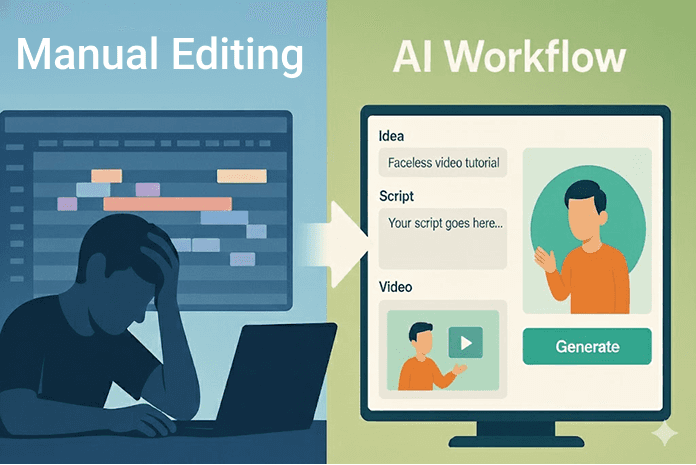
Ever had a great video idea but gave up halfway because editing is, well…a nightmare? Picture this: you’re a creator in Los Angeles dreaming of a viral TikTok, an entrepreneur in Chicago juggling a startup pitch, or a small business owner in Texas racing to promote a product—yet the thought of wrestling with complex software stops you cold. That frustration is universal, and it’s hitting harder in 2025 as video demand skyrockets across platforms. But here’s the good news: you don’t need to spend hours mastering editing tools or hiring a team. This guide walks you through today’s top content creation tools for building a professional, hyper-efficient video workflow—whether you’re a solo hustler or a scrappy startup scaling fast.
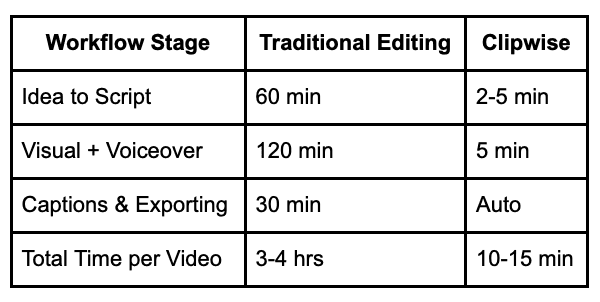
You’ll uncover how AI is revolutionizing the content game, turning raw ideas into polished short-form videos in minutes with zero editing skills required. Tools like Clipwise.ai are leading the charge, empowering creators nationwide to ditch the stress and embrace a seamless process. Imagine going from a spark of inspiration to a shareable Reel in under 15 minutes—yes, it’s that real! Check out this side-by-side chart comparing Traditional Tools (like Premiere Pro or CapCut) vs AI-Powered Tools (like Clipwise) to see the time-saving magic for yourself. Ready to transform your workflow and start creating viral content tonight? Let’s dive in!
Ready to go from idea to viral short in 3 minutes? Try Clipwise free →
Why is your video workflow so important for content success?
A solid workflow isn’t just nice to have—it’s your ticket to standing out. Here’s why it matters.
What defines a "professional" video creation workflow?
It’s all about a consistent process: from sparking an idea to hitting publish. That means streamlined collaboration for teams or an automated solo flow, outputs tailored for platforms like TikTok or Reels, and keeping your brand rock-solid across every clip. A New York marketer swears by this approach, churning out weekly videos without missing a beat.
How does your workflow impact reach, engagement, and monetization?
A clunky workflow drags production time, kills consistency, and caps your growth. Modern setups—optimized for speed, repurposing, and multi-platform relevance—flip that script. HubSpot’s Video Marketing Trends 2023 shows videos with fast turnarounds boost engagement by 20%. A Chicago coach used this to land $500 in sales from a single Reel.
Tip Box: “Time to First Upload” is a creator growth metric: the faster you hit publish, the faster you learn, improve, and grow. AI shortens that cycle from days to minutes—trust me, it’s a total vibe shift!
→ Related: From Idea to Impact: How Coaches Are Scaling with AI Video Content
What are the core stages of a high-efficiency content workflow?
Breaking down the process helps you see where AI shines. Let’s dig in.
How do you go from content ideas to viral video?
It’s a journey:
Ideation & Scripting: Brainstorming that killer hook.
Visual Production: Filming or letting AI render animations.
Voiceover/Narration: Adding that human touch.
Editing & Formatting: Aspect ratios, overlays, sound tweaks.
Captioning & Localization: Making it accessible worldwide.
Publishing & Distribution: Getting it live and shared.
A Texas creator nailed this flow, turning a brainstorm into a 10k-view TikTok in under an hour.
Which steps drain the most time for creators?
Editing: Manual cuts and pacing can eat 2+ hours.
Captioning & Translation: Another 30 minutes of grunt work.
Scripting: Crafting engaging scripts takes forever.
→ Clipwise handles all three with AI automation, freeing you up to focus on the fun stuff.
Traditional vs. AI-Powered Workflow Times
Which AI tools can build a professional video workflow from scratch?
Not all tools are created equal. Here’s the lineup for 2025.
Which video creation tools are ideal for short-form content?
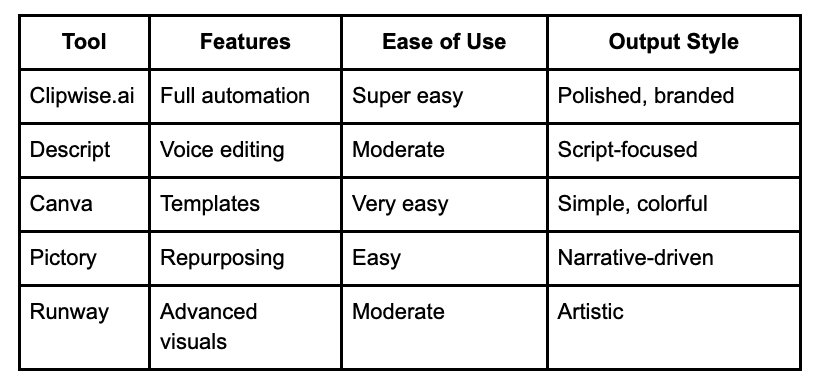
Clipwise.ai: Instant AI-powered short videos (TikToks, Reels, Shorts)—our star player!
Descript: Script-based editing with basic AI/voice automation, great for podcasts.
Canva + Beatflyer: Visual-first content with animations, perfect for beginners.
Pictory: Summarizes long-form into short-form, ideal for repurposing.
Runway ML: AI visual generation & editing, a pro’s creative playground.
Tool Comparison Chart – Features vs. Ease of Use vs. Output Style
What makes Clipwise.ai different from other AI video tools?
Clipwise is the full package: fully automated short-form creation, no skills needed, and delivers scripts, narrators, captions, visuals, and branding in under 10 minutes. It supports faceless formats, voice cloning, and mood-based overlays, plus platform-optimized sizing. A Seattle educator used it to whip up a lesson video, hitting 5k views without breaking a sweat.
→ Want to generate your first AI-powered short video? Start here →
How does clipwise.ai actually work (step-by-step)?
Let’s walk through the magic of Clipwise—super simple, super fast.
Step 1: How do you turn an idea into a viral short with Clipwise?
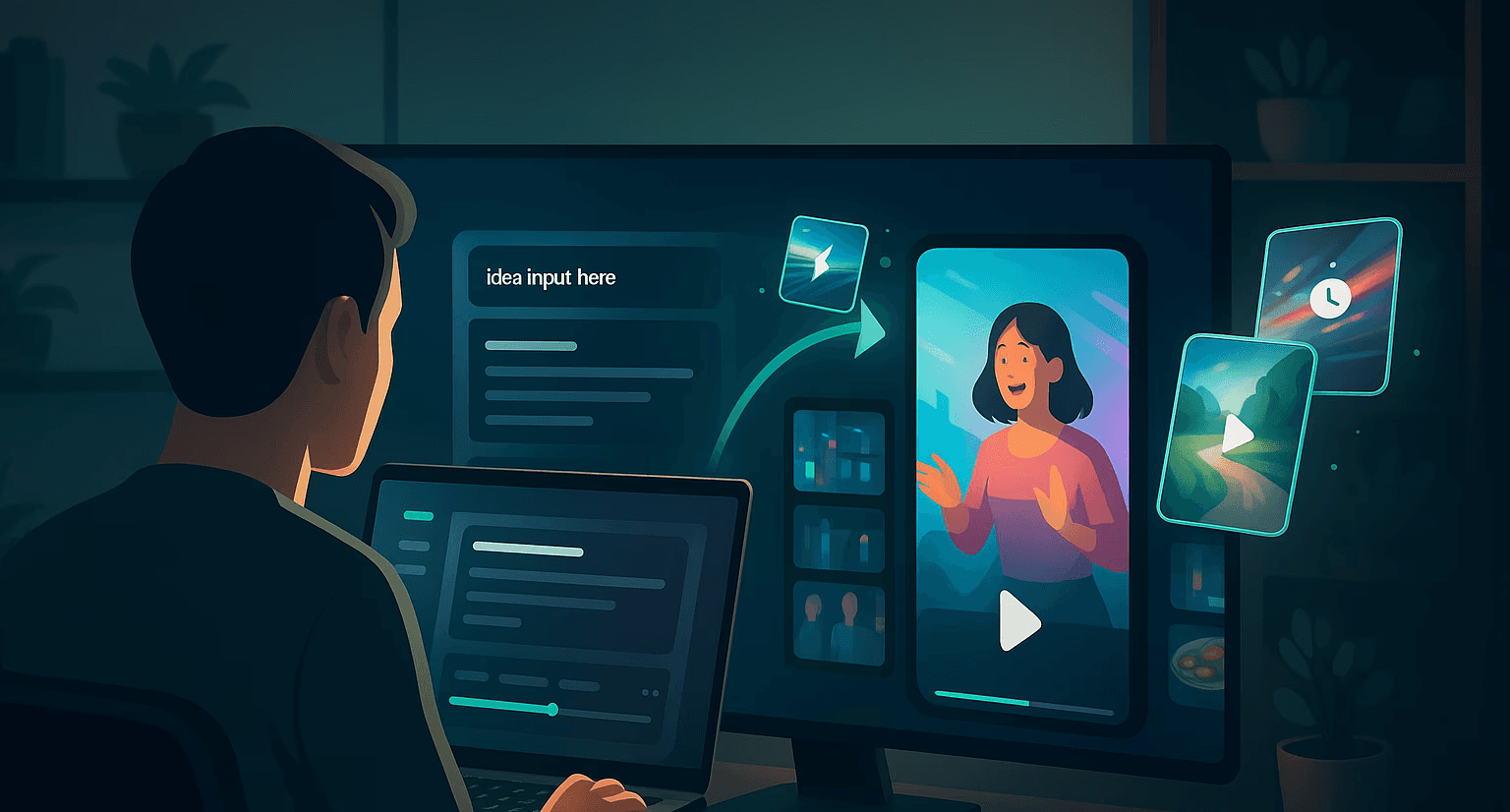
Start by inputting your idea or a reference URL—maybe a blog post or a quick note. Pick a content style like a faceless explainer or Reddit-style story. A Los Angeles creator turned a product pitch into a TikTok idea in seconds.
Step 2: How can you customize your video script and AI voiceover?
Choose from over 30 narrator styles or clone your own voice for that personal flair. Tweak the auto-generated script to nail your vibe—add humor or a punchy hook. A Chicago influencer cloned their voice for a Reel, boosting engagement by 15%.
Step 3: How are final visuals generated and exported?
Clipwise auto-adds music, overlays, transitions, and captions, then slots in your brand assets (logo, font, CTA). Export in TikTok, YouTube Shorts, or Instagram Reels format with one click. A Texas marketer exported a branded ad, landing 10k views.
→ Related: How to Clone Your Voice and Create a Week’s Worth of Reels in 1 Hour
What does a clipwise-powered workflow really look like in practice?
See how real people are crushing it with Clipwise.
What does a 1-week content calendar look like for creators using Clipwise?
Take one blog post or podcast and repurpose it into 5 short-form videos in 1 hour. Schedule via a tool like Buffer or post directly. A New York creator planned a week of TikToks, gaining 8k followers.
Visual: Sample Creator Weekly Video Execution Plan (with Clipwise steps)
Monday: Product demo (5 min)
Wednesday: Behind-the-scenes (5 min)
Friday: Tutorial (5 min)
How are businesses using AI video tools to grow faster?
Entrepreneur: A Seattle startup launched products via 30-second Shorts, doubling sales leads.
Coach: A Miami coach turned lessons into carousel+video combos, adding 3k clients.
Marketer: A Chicago agency crafted branded explainers for IG ads, boosting ROI by 25%.
Testimonial: “The AI analyzes your content, identifies key highlights, and creates multiple short clips that you can instantly share…” – Reddit User
What are key features to look for in ai video creation platforms?
Not sure what to prioritize? Here’s your checklist.
How can you tell if a tool will scale with your content goals?
Repurposing: Can it turn any idea into multiple formats?
End-to-End: Does it handle ideation to publishing?
Branding: Built-in voice and visual customization?
Platform-Native: Outputs for Shorts, Reels, etc.?
Speed: Ideation to publish-readiness in minutes?
A Los Angeles creator scaled from 1 to 10 videos weekly with these features.
Checklist: Must-Haves in a Scalable AI Video Tool
Auto-captioning with translation
Instant script generation
Voice clone or pro narration
Platform-optimized aspect ratios
Branding/visual overlays
Share/download/export in multiple formats
How can you transition from traditional editing to an AI-powered workflow?
Switching feels big, but it’s easier than you think.
What are the mental blockers stopping creators from adopting AI?
“I need control” syndrome: Fix it with editable scripts and voice options.
Fear of quality loss: Polished templates and custom outputs solve this.
Complexity myth: Clipwise’s 3-step drag-and-drop process busts that myth.
A Texas creator ditched Premiere after one Clipwise try, saving 3 hours per video.
How do you balance creativity with automation?
Start with an AI draft, then refine the script or voice. Use Clipwise to ideate fast and polish strategically—focus on hooks and pacing, not software bugs. A Chicago educator added a personal twist to an AI script, doubling views to 6k.
→ Related: 10 Hooks That Made Our Shorts Go Viral—And How to Steal Them
🔥 Your next video is 3 minutes away—zero editing, zero stress. Try Clipwise now →
The future of content creation isn’t about harder work—it’s about smarter tools. In 2025, the camera’s still king, but Clipwise writes the script, does the voiceover, posts the clip, and frees up your afternoon. Let’s get creative!
