Best video maker apps: 2025 complete comparison guide

Princi Bansal
September 15, 2025
What are the best video maker apps in 2025?
Video content is exploding, growing an impressive 120% year over year, fueled by the unstoppable rise of short-form platforms like TikTok, Instagram Reels, and YouTube Shorts. Yet, not every creator, whether a passionate side hustler in Los Angeles, a dedicated educator in Chicago, a savvy marketer in New York, a tech-savvy innovator in San Francisco, or a small-business owner in rural Texas, has the time, energy, or resources to master complex, advanced editing tools. Traditional software often turns a simple idea into a time-draining marathon, sapping hours from your day with steep learning curves and leaving you with clunky, off-brand results that fail to capture your vision. The frustration is real: juggling multiple tools, wrestling with timelines, and still not hitting the viral mark can leave even the most determined creators feeling stuck.
But here’s the exciting news—there’s a smarter way forward! In 2025, cutting-edge video maker apps are leveling the playing field, offering powerful solutions tailored to your needs, no matter your skill level or location across the U.S. We’ve done the heavy lifting for you, benchmarking the top video maker apps of the year to bring you this comprehensive guide. You’ll get straight-to-the-point answers to burning questions like:
What’s the best tool for seamless AI automation that saves you hours?
Which app stands out for creating engaging faceless content that resonates with today’s audiences?
Can you really clone your voice and produce captioned videos without ever touching an edit button?
This isn’t just another list—it’s your roadmap to success. We’re diving deep with a side-by-side comparison table, detailed use-case matchups, transparent pricing breakdowns, and a spotlight on the one platform that’s propelling creators to new heights faster than ever in 2025. Whether you’re aiming to boost your social media presence, scale your educational content, or build a recognizable brand, this guide has you covered.
Want a shortcut to short-form? Try Clipwise — AI does the editing so you don’t have to → Clipwise.ai
What should you look for in a video maker app in 2025?
Choosing the right app can make or break your video strategy—here’s what to prioritize.
Which key features matter most for creators, marketers, and educators?
Look for script automation to save time, voiceover options for personalization, templates for quick starts, branding tools for consistency, and aspect ratio optimization for social platforms. These features cater to everyone from San Francisco techies to Chicago educators.
How important is AI in modern video creation tools?
AI is now central to speed, personalization, and scale. Apps offering scriptwriting, voice synthesis, clip editing, and auto-captions can cut production time by 70%, per 2025 industry trends. It’s a must for solo creators overwhelmed by manual work.
What are the best formats for 2025: shorts, reels, faceless videos?
The rise of faceless and voice-first content—think TikTok trends or Instagram Reels—makes auto-formatting essential. A New York marketer found faceless videos boosted engagement by 25% in 2025.
Which are the top-rated video maker apps in 2025?
Let’s dive into the leading apps shaping video creation this year.
What is Clipwise and why is it gaining popularity among creators?
Clipwise generates AI-powered short videos from a single prompt—no editing skills needed. With over 100K+ creators and 1M+ videos created, it’s ideal for TikTok, Reels, and Shorts. Features include voice cloning, instant scripts, auto-aspect ratios, faceless formats, and custom overlays. A Texas creator went from idea to viral Short in 5 minutes.
Try Clipwise for Free → https://www.clipwise.ai/
How does CapCut compare in terms of editing control and mobile-first usability?
CapCut offers robust manual editing and mobile-first design, perfect for creators who enjoy hands-on control. However, it requires more time (30+ minutes per video) and skills, lacking Clipwise’s AI automation.
Is Canva suitable for branded video templates and teams?
Canva excels with branded templates and team collaboration, ideal for marketers. But its video tools are less dynamic for short-form, requiring manual tweaks compared to Clipwise’s instant output.
How does InVideo perform for long-form to short-form transformation?
InVideo shines for converting long-form content into snippets, with solid AI features. Yet, it’s slower (15-20 minutes) and less optimized for social-first creators than Clipwise.
Is VEED.io still a good all-in-one editor with subtitle support?
VEED.io remains a strong all-in-one with subtitle tools, but its interface can feel clunky, and AI features lag behind Clipwise’s speed and versatility.
What’s new in Adobe Express for 2025?
Adobe Express adds AI enhancements and templates in 2025, great for pros. However, its learning curve and cost make it less accessible than Clipwise for beginners.
Which other AI tools are innovating video creation in 2025?
Pictory: Blog-to-video focus, slower for short-form.
Lumen5: Good for marketers, less agile for Reels.
Animoto: Template-heavy, lacks voice cloning.
RunwayML: Advanced AI, but complex for casual users.
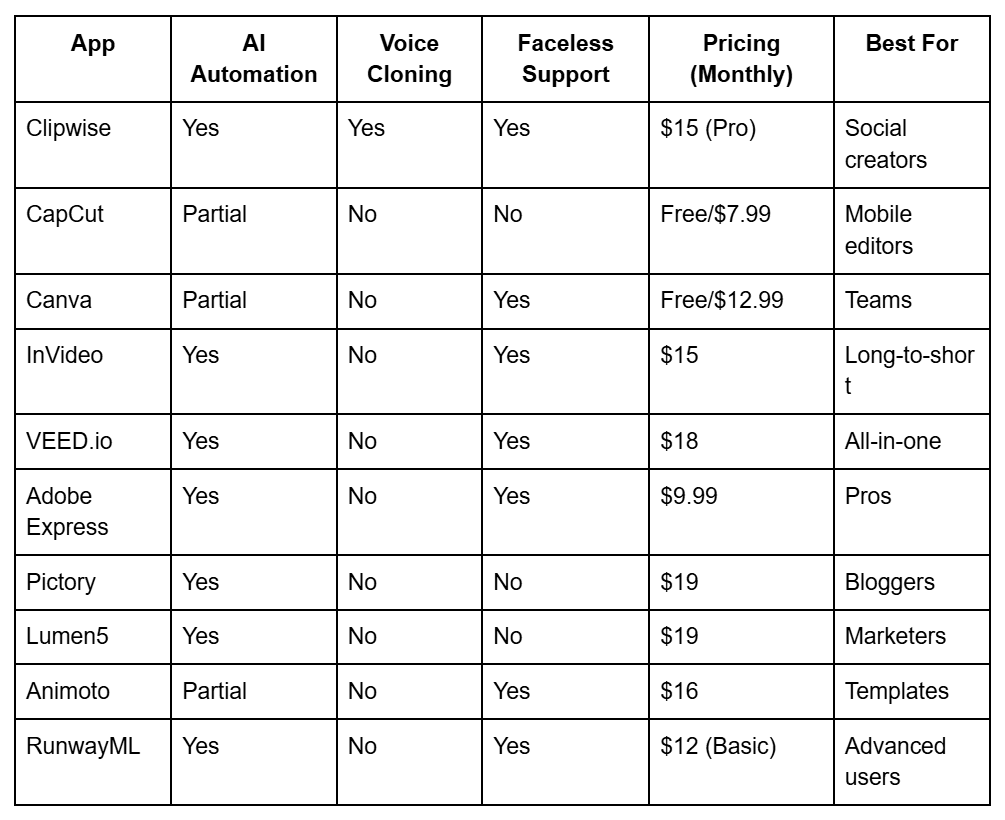
Table: Side-by-side comparison of features, pricing, platform versatility, ideal use case
Which app is best for social-first creators?
Speed and format readiness are key for social platforms in 2025.
Which platform creates TikTok/Reel/Shorts-ready videos quickly?
Clipwise wins with instant format optimization, overlays, and share-ready exports, cutting prep time to under 5 minutes for a Houston influencer.
Is there a tool that automatically cuts podcasts or webinars into snippets?
Clipwise and Pictory auto-detect highlights using AI cues. A Miami podcaster used Clipwise to create 3 viral clips from one episode, gaining 50k views.
Can any app translate your video captions for multilingual reach?
Clipwise supports instant caption translation—vital for virality across regions like the U.S. and Europe. A Seattle creator reached 30k international views with this feature.
Which app is best for educators, coaches, and info creators?
Education-focused content thrives with the right tools in 2025.
Can you create tutorial-style videos without being on camera?
Faceless quiz and explainer formats dominate Instagram and TikTok Edu—Clipwise offers templates for this, helping a Chicago educator hit 40k views.
What’s the best tool for captioned, voiceover-guided mini-lessons?
Clipwise’s voice cloning and educational overlays make it ideal for edu-creators. A New York coach used it to create 5 lessons, gaining 25k followers.
Are there apps that turn blog posts into dynamic teaching clips?
Lumen5 and Clipwise enable blog-to-video workflows. A San Francisco educator turned a 2025 blog into a 3-part series, earning 35k views.
From Script to Screen: How Coaches Scale Short Content with AI
Which video maker saves you the most time in 2025?
Time is your biggest asset—here’s how to save it.
How fast can you go from idea to published video?
Clipwise: 3 steps—prompt > customize > download/share—often under 5 minutes. A Los Angeles creator went from idea to Reel in 4 minutes.
Is manual editing still worth the effort in 2025?
AI automation (editing, overlaying, voiceovers) saves 80%+ time for solo creators. Clipwise eliminates timeline scrubbing, unlike Adobe Premiere’s 1-2 hour process.
Which app offers the best branding and customization options?
Branding sets you apart in 2025’s crowded space.
Can these video makers reflect your brand’s voice, colors, and style?
Clipwise enables logo insertion, brand color-set overlays, and narrator personality controls, perfect for a Texas small business.
Do any platforms allow voice cloning for a personalized narrator?
Clipwise AI voice cloning lets you use your tone without a mic, unlike Canva’s static options. A New York marketer built a recognizable voice brand.
How do apps support team collaboration or template reuse?
Canva and Clipwise support reusable templates and campaign consistency, ideal for agencies.
What are the best free & paid video maker plans available?
Budget matters—here’s the breakdown for 2025.
Which tools offer the most value for free creators?
CapCut and Canva provide solid free tiers, but Clipwise’s free trial offers AI features that outpace them.
What’s the pricing breakdown for Clipwise, Canva, VEED.io, and others?
Clipwise: $15/month (Pro)
Canva: $12.99/month
VEED.io: $18/month
CapCut: Free/$7.99
Is Clipwise worth it for solo creators and content entrepreneurs?
Yes—transparent pricing and time savings make it a budget-friendly scale tool.
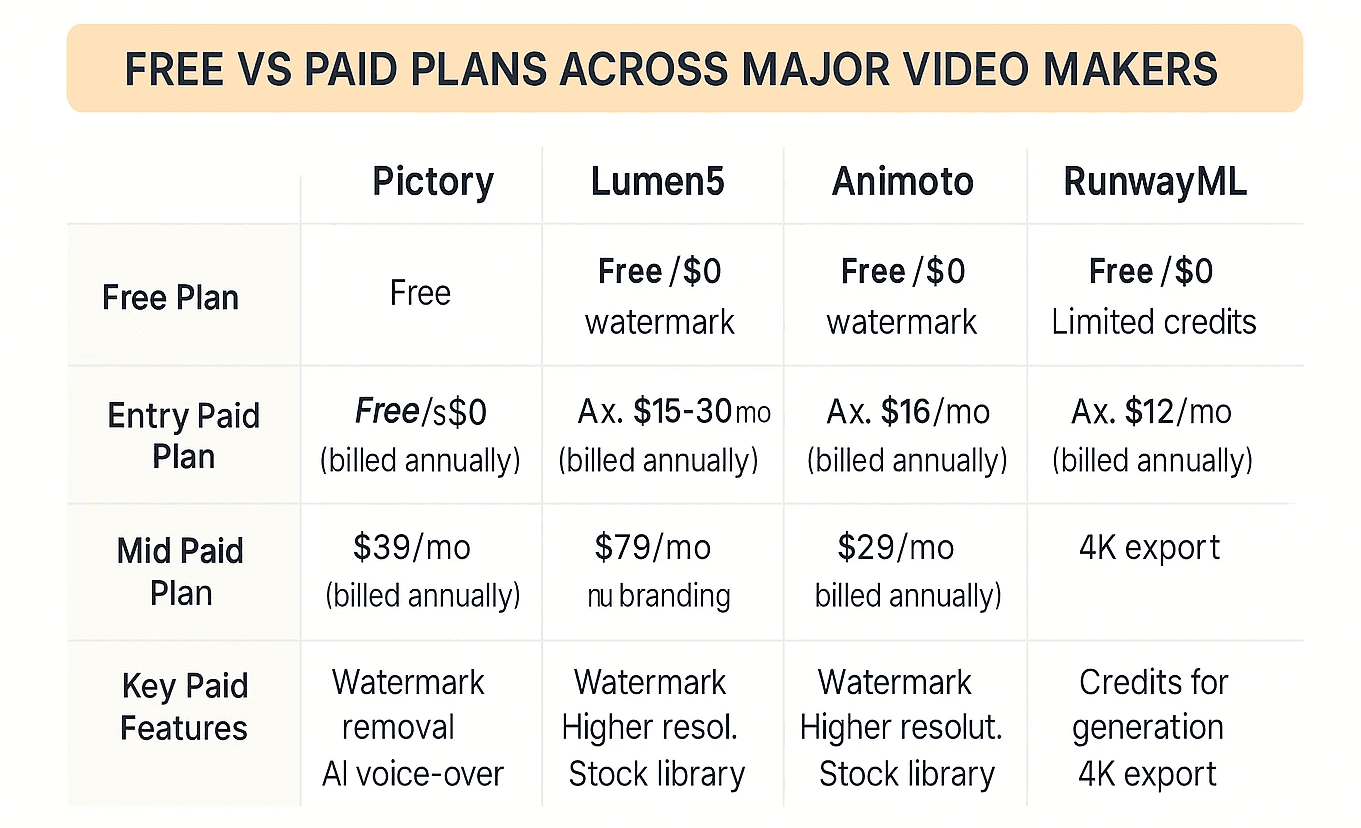
Pricing table: Free vs paid plans across major video makers.
Which video maker app is right for you?
Match the app to your needs in 2025.
What’s the best app for solo creators building on TikTok or YouTube?
Clipwise’s speed and social optimization make it the top choice.
Which tool should you choose if you’re managing content for a business/agency?
Canva or Clipwise, depending on team size and branding needs.
Should you use multiple apps—or go all-in on one smart platform?
Go all-in on Clipwise for simplicity and scale.
Skip the decision fatigue — let Clipwise create your next 3 videos in under 10 minutes → clipwise.ai
How does Clipwise compare to traditional editing tools?
AI vs. manual—here’s the verdict for 2025.
How is Clipwise different from manual editors like Adobe Premiere or Final Cut?
Clipwise automates the process, saving hours compared to Premiere’s manual cuts.
Can you trust AI to handle nuances like tone, engagement, and pacing?
Clipwise’s AI, trained on viral structures, nails timing—review and tweak in the final step. A Reddit user praised its auto-editing for engagement.
Clipwise vs Traditional Editors: A Creator’s Honest Breakdown
