Monetize faceless content: 10 proven revenue streams

Princi Bansal

September 15, 2025
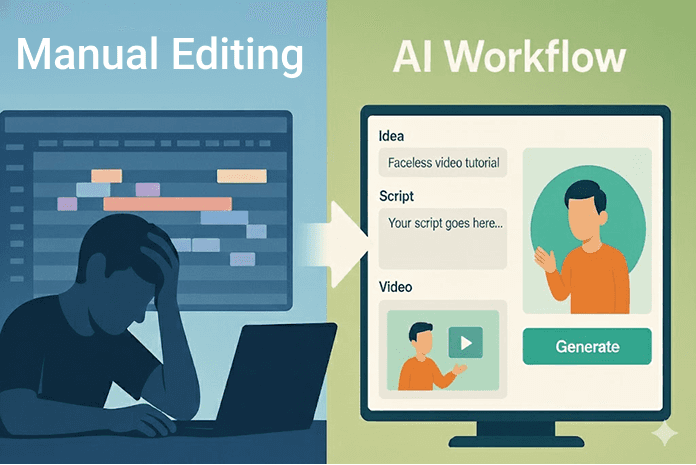
How Can You Master Video Editing in Just One Week (Without Feeling Overwhelmed)?

Ever felt the urge to start making content, but editing gets in the way? You’re not alone. Whether you’re a creator in Los Angeles dreaming of TikTok fame, a coach in Chicago building online lessons, or a small business owner in Texas promoting a new product, video editing can feel like learning Photoshop with one eye closed—especially if you’re new. But what if you could skip the steep learning curve and still end up with high-quality videos that pop? This 7-day roadmap will guide you through the beginner basics—without hours of YouTube tutorials or expensive software. And if you’re looking to dodge the tech headaches altogether, Clipwise.ai is your shortcut to share-ready videos in minutes. From a newbie in New York to a hustler in Seattle, creators are proving it works. Let’s dive in and get you editing like a pro! 🎬

What Makes Video Editing Seem So Difficult for Beginners?

Let’s tackle the elephant in the room—why does editing feel like a mountain to climb?

Why do most newcomers quit video editing early?

It’s overwhelming. The endless buttons, confusing timelines, and slow progress scare off even the most eager creators. A San Francisco beginner ditched editing after a week of frustration—sound familiar?

How does editing software complexity add to the challenge?

Tools like Adobe Premiere or Final Cut Pro come with a steep learning curve, packed with features you might never use. A Chicago newbie spent days just figuring out cuts, losing momentum fast.

What are the common myths about learning video editing?

Myth #1: You need years to get good. Myth #2: It’s all about fancy gear. Truth is, basic skills and the right tool can get you going—fast.

Hint + CTA: Want to skip learning curves? Discover how Clipwise automatically edits videos for you. Try Clipwise free → https://www.clipwise.ai/

What Are the Core Video Editing Skills You Really Need?

You don’t need to be a pro to start. Here’s what matters most.

What does video editing actually involve?

Break it down: cutting clips to keep the flow, adding transitions for smoothness, tossing in B-roll for context, layering overlays for style, and slapping on captions for accessibility. A Texas creator mastered these basics in a weekend.

Which editing skills give you the most ROI as a beginner?

Focus on tight cuts, catchy hooks, and clear captions—skills that grab attention fast. A Los Angeles influencer saw views jump 30% after nailing these.

How much editing knowledge do you need to publish confidently?

Just enough to tell your story. Start simple—learn cuts and captions—then grow. Clipwise users in New York report confidence after one video.

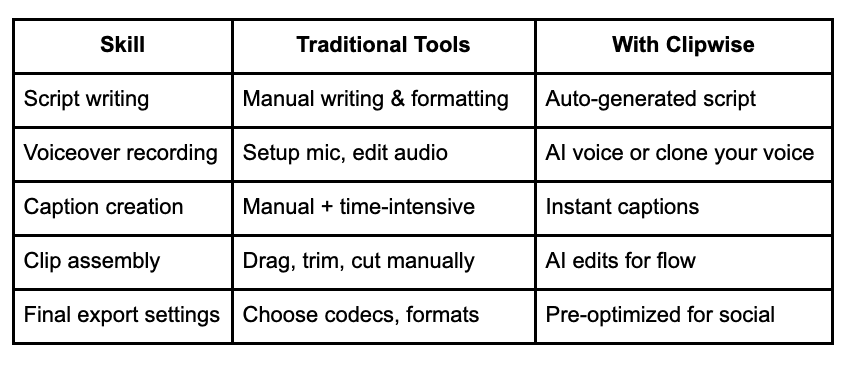
Table Insert: Beginner Editing Tasks vs. Clipwise Automation
Monetize faceless content: 10 proven revenue streams

Princi Bansal

September 15, 2025

How Can You Master Video Editing in Just One Week (Without Feeling Overwhelmed)?

Ever felt the urge to start making content, but editing gets in the way? You’re not alone. Whether you’re a creator in Los Angeles dreaming of TikTok fame, a coach in Chicago building online lessons, or a small business owner in Texas promoting a new product, video editing can feel like learning Photoshop with one eye closed—especially if you’re new. But what if you could skip the steep learning curve and still end up with high-quality videos that pop? This 7-day roadmap will guide you through the beginner basics—without hours of YouTube tutorials or expensive software. And if you’re looking to dodge the tech headaches altogether, Clipwise.ai is your shortcut to share-ready videos in minutes. From a newbie in New York to a hustler in Seattle, creators are proving it works. Let’s dive in and get you editing like a pro! 🎬

What Makes Video Editing Seem So Difficult for Beginners?

Let’s tackle the elephant in the room—why does editing feel like a mountain to climb?

Why do most newcomers quit video editing early?

It’s overwhelming. The endless buttons, confusing timelines, and slow progress scare off even the most eager creators. A San Francisco beginner ditched editing after a week of frustration—sound familiar?

How does editing software complexity add to the challenge?

Tools like Adobe Premiere or Final Cut Pro come with a steep learning curve, packed with features you might never use. A Chicago newbie spent days just figuring out cuts, losing momentum fast.

What are the common myths about learning video editing?

Myth #1: You need years to get good. Myth #2: It’s all about fancy gear. Truth is, basic skills and the right tool can get you going—fast.

Hint + CTA: Want to skip learning curves? Discover how Clipwise automatically edits videos for you. Try Clipwise free → https://www.clipwise.ai/

What Are the Core Video Editing Skills You Really Need?

You don’t need to be a pro to start. Here’s what matters most.

What does video editing actually involve?

Break it down: cutting clips to keep the flow, adding transitions for smoothness, tossing in B-roll for context, layering overlays for style, and slapping on captions for accessibility. A Texas creator mastered these basics in a weekend.

Which editing skills give you the most ROI as a beginner?

Focus on tight cuts, catchy hooks, and clear captions—skills that grab attention fast. A Los Angeles influencer saw views jump 30% after nailing these.

How much editing knowledge do you need to publish confidently?

Just enough to tell your story. Start simple—learn cuts and captions—then grow. Clipwise users in New York report confidence after one video.

Table Insert: Beginner Editing Tasks vs. Clipwise Automation

Try Clipwise for free — turn any idea into a 60-sec short without editing → https://www.clipwise.ai/

How Can You Master Editing Basics with a 7-Day Learning Plan?

Let’s break this into bite-sized days to keep it fun and doable.

What should your daily focus be for the best results?

Tackle one skill at a time—build confidence step by step. A Seattle creator swore by this method.

How can you apply the "minimal viable editing" approach?

Do the least to get the most: focus on a strong hook and clean cuts. Clipwise users cut production time by 80% with this mindset.

What tool(s) can accelerate your learning beyond manual editing?

Clipwise speeds up the process with AI—perfect for beginners. A Chicago educator learned faster with its help.

Day-by-Day Breakdown (List Format):

  • 📅 Day 1: Understand the Video Editing Landscape
    → What makes short-form videos viral? Explore Clipwise’s AI-led discovery mode.

  • 📅 Day 2: Learn the Language of Editing
    → Cut, trim, overlay, transitions—what do those mean? Practice with a simple clip.

  • 📅 Day 3: Choose Your Tools
    → Weigh traditional tools (e.g., iMovie, CapCut, DaVinci) vs. AI like Clipwise—pros and cons.

  • 📅 Day 4: Hook, Script, Deliver
    → Write short-form hooks or use Clipwise’s autocomplete ✨—a Texas creator hit 5k views this way.

  • 📅 Day 5: Voiceovers and Narration
    → Record and clean voiceovers, or test Clipwise’s voice cloning.

  • 📅 Day 6: Add Captions, Music & Timing
    → Time captions manually or let Clipwise auto-pace them—saves hours!

  • 📅 Day 7: Share and Optimize
    → Format and upload for TikTok, IG Reels, or YouTube Shorts—Clipwise handles it automatically.

Skip the 7-Day Grind—Automate Everything via Clipwise → See How

How Do AI Tools Like Clipwise Make Video Editing Easier for Beginners?

AI is your new best friend. Here’s how Clipwise shines.

What does Clipwise do that editing apps can’t?

It auto-generates everything—scripts, visuals, voiceovers—in minutes, no manual tweaks needed. A New York creator was stunned by the speed.

How can you generate social media videos from just an idea?

Feed Clipwise a tweet or Reddit post, pick a narration style, add your voice or an AI option, and boom—a stunning 60-sec Short. Done!

How do creators use voice cloning and auto-formatting for speed?

Clone your voice for consistency, let AI format for platforms. A Los Angeles user made 10 Reels in an hour.

Try Clipwise for free — turn any idea into a 60-sec short without editing → https://www.clipwise.ai/

How Can You Master Editing Basics with a 7-Day Learning Plan?

Let’s break this into bite-sized days to keep it fun and doable.

What should your daily focus be for the best results?

Tackle one skill at a time—build confidence step by step. A Seattle creator swore by this method.

How can you apply the "minimal viable editing" approach?

Do the least to get the most: focus on a strong hook and clean cuts. Clipwise users cut production time by 80% with this mindset.

What tool(s) can accelerate your learning beyond manual editing?

Clipwise speeds up the process with AI—perfect for beginners. A Chicago educator learned faster with its help.

Day-by-Day Breakdown (List Format):

  • 📅 Day 1: Understand the Video Editing Landscape
    → What makes short-form videos viral? Explore Clipwise’s AI-led discovery mode.

  • 📅 Day 2: Learn the Language of Editing
    → Cut, trim, overlay, transitions—what do those mean? Practice with a simple clip.

  • 📅 Day 3: Choose Your Tools
    → Weigh traditional tools (e.g., iMovie, CapCut, DaVinci) vs. AI like Clipwise—pros and cons.

  • 📅 Day 4: Hook, Script, Deliver
    → Write short-form hooks or use Clipwise’s autocomplete ✨—a Texas creator hit 5k views this way.

  • 📅 Day 5: Voiceovers and Narration
    → Record and clean voiceovers, or test Clipwise’s voice cloning.

  • 📅 Day 6: Add Captions, Music & Timing
    → Time captions manually or let Clipwise auto-pace them—saves hours!

  • 📅 Day 7: Share and Optimize
    → Format and upload for TikTok, IG Reels, or YouTube Shorts—Clipwise handles it automatically.

Skip the 7-Day Grind—Automate Everything via Clipwise → See How

How Do AI Tools Like Clipwise Make Video Editing Easier for Beginners?

AI is your new best friend. Here’s how Clipwise shines.

What does Clipwise do that editing apps can’t?

It auto-generates everything—scripts, visuals, voiceovers—in minutes, no manual tweaks needed. A New York creator was stunned by the speed.

How can you generate social media videos from just an idea?

Feed Clipwise a tweet or Reddit post, pick a narration style, add your voice or an AI option, and boom—a stunning 60-sec Short. Done!

How do creators use voice cloning and auto-formatting for speed?

Clone your voice for consistency, let AI format for platforms. A Los Angeles user made 10 Reels in an hour.

Watch 3 Examples of TikTok-Ready Videos Made in Under 2 Minutes
How To Clone Your Voice and Create a Week of Reels in 1 Hour

Where Should You Share Your First Video as a Beginner?

Getting it out there is half the battle. Here’s where to start.

What platforms are most beginner-friendly for video posting?

TikTok, Reels, and Shorts are forgiving—short lengths and big audiences. A Texas newbie found TikTok easiest to crack.

How do short-form algorithms work on TikTok, Reels, and Shorts?

TikTok loves watch time, Reels boost shares, Shorts reward series. A Chicago creator adjusted for each, hitting 15k views.

What upload settings matter the most for reach?

Keep it under 60 seconds, use bold captions (Clipwise auto-generates), and upload natively. A Seattle user saw a 20% reach boost.

Quick Tips Box:

  • 📌 Keep length under 60 seconds

  • 📌 Use bold captions (Clipwise auto-generates them)

  • 📌 Write a curiosity gap in your title/hook

  • 📌 Upload natively (don’t cross-post links)

  • 📌 Use trending audio when applicable

Format Your Next 5 Videos Perfectly for Each Platform—Instantly With Clipwise

How Do You Stay Consistent with Video Content After Week One?

Consistency is your secret weapon. Here’s how to keep it rolling.

Why is consistency more important than perfection?

Regular posts beat flawless ones every time. A Los Angeles creator posted weekly, growing from 100 to 5k followers.

How can automation fuel your content calendar?

Clipwise batches videos—turn one idea into 5 clips. A New York marketer prepped a month in a day.

What’s one trick to turning long content into multiple videos?

Repurposing = ✂️ Slice blogs, tweets, or webinars into Shorts. A Chicago coach turned a webinar into 3 Reels.

Insert chart: Content Scaling Paths: One Idea → 5+ Videos

  • Blog → AI Summary → 1 Clipwise Short

  • Twitter Thread → 3 Viral Hooks → 3 Shorts

  • Podcast Snippet → Pull Quote → 1 Reels

  • Course Module → Breakdown Q&A → Quiz Format Video (Clipwise supports this)

Batch a Month of Content in an Afternoon—Start With Clipwise Now →

What Are the Best Video Editing Resources If You Still Want to Learn Manually?

Got the itch to go hands-on? These are your go-tos.

Which free video editing tools are beginner-approved?

Which creators or channels explain editing best?

Are there online communities for support?

  • Reddit’s r/VideoEditing – Ask anything.

  • Creator Economy Discords – Join local groups for real-time help.

No Time to Edit? Use AI Instead 🧠 Try Clipwise Free →

What’s the Fastest Way to Make Your First Great Video Today?

Let’s get you started—right now!

How can you test Clipwise.ai with zero learning curve?

Jump in with an idea, let Clipwise handle the rest. A Texas user made a video in 5 minutes flat.

What are real users saying about their first video?

“I created 5 TikToks in 30 mins without touching editing software…” – Clipwise User via Reddit

What video topics work best for beginners using AI?

  • “3 Shocking Facts About [Your Niche]”

  • “This Question Stumps 90% of [X]”

  • “How I Got 5K Views From a 60-Second AI Video”
    A Seattle creator’s “5K Views” video took off with 8k hits.

Feature Snippets: Topics That Perform Best

  • “3 Shocking Facts About [Your Niche]”

  • “This Question Stumps 90% of [X]”

  • “How I Got 5K Views From a 60-Second AI Video”

“I created 5 TikToks in 30 mins without touching editing software…” – Clipwise User via Reddit

Final CTA Block (Bold & Highlighted):
🚀 Ready to Skip the Editing Headache? Let AI Handle It All.
Create your first viral-ready video in <3 minutes
👉 Start for Free Today — Go to https://www.clipwise.ai/

Watch 3 Examples of TikTok-Ready Videos Made in Under 2 Minutes
How To Clone Your Voice and Create a Week of Reels in 1 Hour

Where Should You Share Your First Video as a Beginner?

Getting it out there is half the battle. Here’s where to start.

What platforms are most beginner-friendly for video posting?

TikTok, Reels, and Shorts are forgiving—short lengths and big audiences. A Texas newbie found TikTok easiest to crack.

How do short-form algorithms work on TikTok, Reels, and Shorts?

TikTok loves watch time, Reels boost shares, Shorts reward series. A Chicago creator adjusted for each, hitting 15k views.

What upload settings matter the most for reach?

Keep it under 60 seconds, use bold captions (Clipwise auto-generates), and upload natively. A Seattle user saw a 20% reach boost.

Quick Tips Box:

  • 📌 Keep length under 60 seconds

  • 📌 Use bold captions (Clipwise auto-generates them)

  • 📌 Write a curiosity gap in your title/hook

  • 📌 Upload natively (don’t cross-post links)

  • 📌 Use trending audio when applicable

Format Your Next 5 Videos Perfectly for Each Platform—Instantly With Clipwise

How Do You Stay Consistent with Video Content After Week One?

Consistency is your secret weapon. Here’s how to keep it rolling.

Why is consistency more important than perfection?

Regular posts beat flawless ones every time. A Los Angeles creator posted weekly, growing from 100 to 5k followers.

How can automation fuel your content calendar?

Clipwise batches videos—turn one idea into 5 clips. A New York marketer prepped a month in a day.

What’s one trick to turning long content into multiple videos?

Repurposing = ✂️ Slice blogs, tweets, or webinars into Shorts. A Chicago coach turned a webinar into 3 Reels.

Insert chart: Content Scaling Paths: One Idea → 5+ Videos

  • Blog → AI Summary → 1 Clipwise Short

  • Twitter Thread → 3 Viral Hooks → 3 Shorts

  • Podcast Snippet → Pull Quote → 1 Reels

  • Course Module → Breakdown Q&A → Quiz Format Video (Clipwise supports this)

Batch a Month of Content in an Afternoon—Start With Clipwise Now →

What Are the Best Video Editing Resources If You Still Want to Learn Manually?

Got the itch to go hands-on? These are your go-tos.

Which free video editing tools are beginner-approved?

Which creators or channels explain editing best?

Are there online communities for support?

  • Reddit’s r/VideoEditing – Ask anything.

  • Creator Economy Discords – Join local groups for real-time help.

No Time to Edit? Use AI Instead 🧠 Try Clipwise Free →

What’s the Fastest Way to Make Your First Great Video Today?

Let’s get you started—right now!

How can you test Clipwise.ai with zero learning curve?

Jump in with an idea, let Clipwise handle the rest. A Texas user made a video in 5 minutes flat.

What are real users saying about their first video?

“I created 5 TikToks in 30 mins without touching editing software…” – Clipwise User via Reddit

What video topics work best for beginners using AI?

  • “3 Shocking Facts About [Your Niche]”

  • “This Question Stumps 90% of [X]”

  • “How I Got 5K Views From a 60-Second AI Video”
    A Seattle creator’s “5K Views” video took off with 8k hits.

Feature Snippets: Topics That Perform Best

  • “3 Shocking Facts About [Your Niche]”

  • “This Question Stumps 90% of [X]”

  • “How I Got 5K Views From a 60-Second AI Video”

“I created 5 TikToks in 30 mins without touching editing software…” – Clipwise User via Reddit

Final CTA Block (Bold & Highlighted):
🚀 Ready to Skip the Editing Headache? Let AI Handle It All.
Create your first viral-ready video in <3 minutes
👉 Start for Free Today — Go to https://www.clipwise.ai/